
Malbolge Tutorial – Learning Malbolge
In this beginner's tutorial, we write a simple non-terminating cat program in Malbolge. The tutorial is organized as follows. First, a cat program written in the assembly language HeLL is explained in detail by debugging it step by step with the HeLL IDE. Then, we translate the cat program into Malbolge code manually, using Lou Scheffer's Malbolge pages and an online ternary calculator.
Table of Contents
- Introduction
- A cat Program in HeLL
- Assembling the cat Program to Malbolge
- Further Reading
- List of Tools
1. Introduction
Please read the Malbolge language definition. It is not necessary that you have understood everything or learned it by heart. However, you may need to lookup some details of the language definition at certain times during this tutorial by your own.
There are two main techniques for writing Malbolge programs. The first is for programs that simply print fixed text and terminate. The capabilities of this technique are very limited, and there are even automated generators for it. The second technique is suited for complex Malbolge programs, i.e. programs with conditional branches, loops, and input processing. With this technique, the programmer first designs the Malbolge program as if every memory cell of the virtual Malbolge machine could be initialized with completely arbitrary values at startup — even though this is not true for Malbolge. In a second step, the programmer (or an automated assembler like LMAO) generates the Malbolge initialization code that writes the required values into the corresponding memory cells.
There exist two assembly languages for Malbolge: HeLL and LAL. LAL is the older one, created by Japanese researchers who were the first to genuinely program in Malbolge. However, in 2013 a precise specification of LAL was not publicly available (this has since changed), which prompted the creation of HeLL.
Both languages introduce labels — so that the programmer does not need to use raw ternary memory addresses — and mnemonics for the Malbolge instructions (e.g. Jmp for i). The assembler (for HeLL, this is LMAO) handles the memory layout and generates the Malbolge initialization code. That is almost everything these assembly languages do, so programming in them still requires a lot of Malbolge knowledge.
This tutorial teaches HeLL first, because it is much easier to understand than raw Malbolge. The second part covers the manual translation of HeLL to Malbolge. If you have trouble following, feel free to send questions by email.
2. A cat Program in HeLL
In Malbolge, code and data are stored together in the same memory. However, when writing Malbolge programs, it makes sense to distinguish between memory cells that are actually used for the code and those that are used for data. In HeLL, the words .CODE and .DATA are used to define the corresponding sections.
All code and all data within these sections must be assigned to a label. For the code section, it is important to be aware of the fact that Malbolge instructions are cyclic self-modifying. This kind of modification takes place after execution of an instruction and is often called encryption. In HeLL, a cycle can be specified by all of its components, separated by slashes each. E.g., Nop/MovD is a Nop instruction (no operation) that turns into a MovD instruction after encryption. After its second encryption, it is turned into a Nop instruction again, and so on.
It is not possible to build every cycle in Malbolge. If impossible cycles occur, the Malbolge assembler will throw an error. More information about valid cycles and how to find them will be given later in this tutorial. If no cycle is specified, the Malbolge assembler will choose an arbitrary cycle that starts with the given instruction.
Below, you can find the entire cat program written in HeLL. The actual program logic appears in the data section.
.CODE
MOVD:
	Nop/MovD
	Jmp

IN_OUT:
	In/Nop/Out/Nop/Nop/Nop/Nop/Nop/Nop
	Jmp

.DATA
ENTRY:
	IN_OUT ?-
	R_MOVD
	MOVD ENTRY
When a HeLL program is started, the code pointer C points to a random Jmp instruction while the data pointer D points to the data at the ENTRY label. Thus, for every HeLL program, the first data word at the ENTRY label should always be a pointer to the CODE section with the first command to be executed.
In our case, we start with the IN_OUT code snippet that reads a character from stdin into the A register and, afterwards, performs a Jmp to another code snippet specified in the DATA section. Note that the In/Nop/Out/Nop/Nop/Nop/Nop/Nop command turns into Nop/Out/Nop/Nop/Nop/Nop/Nop/In after execution.
Let us debug the above HeLL program step by step using the HeLL IDE to build a concrete understanding of how it executes. The debugger can be started from the menu bar.
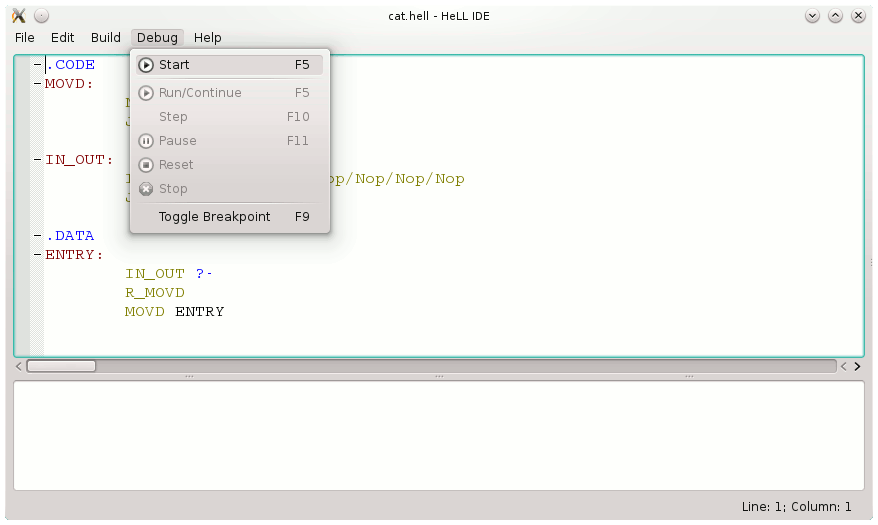
This turns the HeLL IDE into debugging mode.
![HeLL IDE: A yellow arrow points at IN_OUT below the ENTRY label.
The instruction Nop of the cycle Nop/MovD is marked bold.
The instruction In of the cycle In/Nop/Out/Nop/Nop/Nop/Nop/Nop is marked
as well. Also the Jmp instructions are bold. At the bottom one can see
a terminal. At the right the following information are provided:
C: somewhere in the initialization section;
[C]: Jmp/Nop/Nop/Nop/...;
[D]: IN_OUT - 1; A: 0t2222211212 '9'.
There is an empty table below this text, the two columns of which
are labeled with address and value.](img2.png)
The yellow arrow points at the memory position the virtual Malbolge machine's data register D is pointing to. In the code section, the current position of each instruction cycle is marked bold. At program start, this will always be the first instruction of each cycle. When a HeLL program is started, the code register C is guaranteed to point at a Jmp instruction. Typically, this Jmp instruction lies in Malbolge code somewhere outside of the HeLL code. Thus, the position of the C register cannot be marked in the debugger yet. Starting with the next step, the C register's position will be indicated by a green arrow.
We can see the state of the virtual Malbolge machine's registers and specific memory cells on the right side. While the C register points to some unknown memory address containing a Jmp/Nop/Nop/... instruction cycle, the D register points to a memory cell containing the value IN_OUT - 1. If you look at the HeLL code, you notice that the memory cell pointed at by the yellow "data" arrow should actually hold the value IN_OUT. This contradicts the value displayed at the right side of the window. However, the value on the right side is the real one. The reason is that, whenever a HeLL program is assembled to Malbolge, every reference is decremented by one automatically.
The reason for this strange behaviour is as follows. Recall how an instruction in Malbolge is executed.
- The instruction at the C register is executed.
- The instruction at the C register is encrypted.
- Both the C and D registers are incremented by one.
In order to save the user from decrementing every jump address again and again, the LMAO Malbolge assembler performs the decrement by one automatically. Since the D register behaves analogously during a MovD instruction, without exception, every reference is decremented by one by the Malbolge assembler automatically.
Let us continue to discuss the debug view of the HeLL IDE shown above. The value of the A register is not defined when the execution of a HeLL program starts. Thus, we should never read from the A register until we have written a value into it using the Rot or In instruction, but not the Opr instruction. In fact, the A register is initialized with the value ENTRY - 1 if the current version of LMAO is used. This behavior may change for future versions of LMAO, so we must not rely on it.
Additionally to the registers and memory cells described above, it is possible to watch user-defined expressions with the HeLL IDE. To demonstrate this feature, we watch the content of the memory cells at MOVD and IN_OUT. While MOVD is the address of the Nop/MovD instruction, [MOVD] is the content at that address, i.e. the Malbolge instruction Nop/MovD itself.
![HeLL IDE: In the right table, two rows were added.
The first row contains address [MOVD] and value 0t0000002121 'F',
while the second row contains address [IN_OUT] and value 0t0000002222 'P'.
The remaining parts of the window are unchanged.](img3.png)
The values of [MOVD] and [IN_OUT] are the encoded Malbolge instructions for Nop/MovD and In/Nop/Out/Nop/Nop/Nop/Nop/Nop/Nop. Here, the instruction Nop/MovD is encoded as the ASCII character 'F'. Recall that in Malbolge the encoding of an instruction depends on its address in memory modulo 94. As we step through the program we will see the values at MOVD and IN_OUT change whenever the active instruction of the corresponding cycle advances.
Let us execute one single step of the program now. Recall that the C register points to a Jmp instruction while the D register points to a memory cell containing the value IN_OUT - 1. Now we can observe how these values have changed.
![HeLL IDE: A green arrow appeared,
pointing at the instruction cycle In/Nop/Out/Nop/Nop/Nop/Nop/Nop.
The yellow arrow points at ?- now, directly behind IN_OUT.
The text above the table at the right side is now:
C: IN_OUT;
[C]: In/Nop/Out/Nop/Nop/Nop/Nop/Nop;
[D]: ?-; A: 0t2222211212 '9'.
The remaining parts of the window are not changed.](img4.png)
Now, the code register C is pointing at the In instruction. The D register has been incremented and is pointing now to a memory cell with undefined content, which is indicated by ?-.
During the next step, the program will execute the In instruction and thus read one byte of user input. So, before running this step, let us type something for the program to read into the terminal at the bottom of the HeLL IDE.
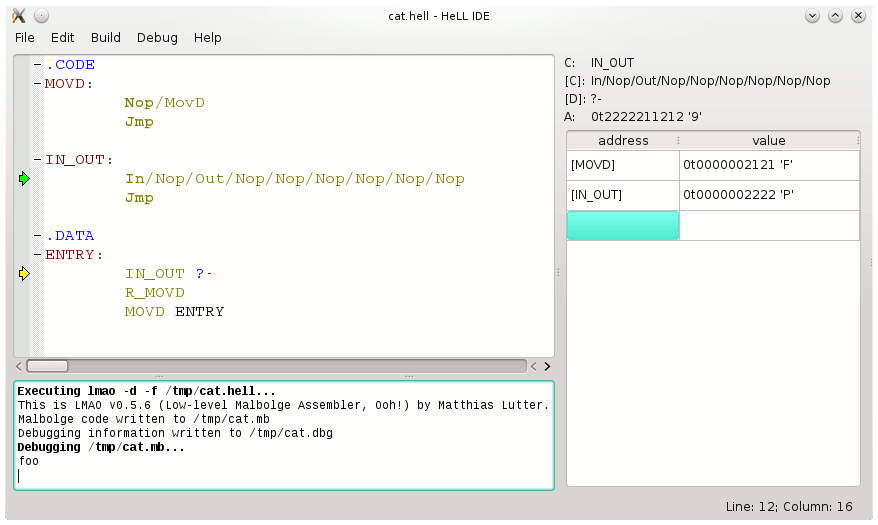
We have just written the word "foo". Now we can execute the next step that will load the character 'f' of our input into the A register.
![HeLL IDE: The first Nop of the In/Nop/Out/Nop/Nop/Nop/Nop/Nop
instruction cycle is now marked. The green arrow points to
the Jmp instruction right below In/Nop/Out/Nop/Nop/Nop/Nop/Nop.
The yellow arrow points at R_MOVD below ?-. Information at the right side
of the window:
C: IN_OUT + 1;
[C]: Jmp/Nop/Nop/Nop/MovD;
[D]: R_MOVD - 1;
A: 0t0000010210 'f'.
The value of [IN_OUT] is now 0t0000002110 'B'.
The other things are unchanged.](img6.png)
As expected, the A register holds the value 'f' (ternary 0t10210) now. Also, the instruction In has been modified, so that the cycle's position is now at the first Nop instruction (it is highlighted by boldface in the screenshot above). The C and D registers have been incremented.
The next command executed will be a Jmp to R_MOVD. The R_ prefix is a special HeLL notation, which is a mnemonic for restore. Literally, this command will restore the MovD instruction at the label MOVD. At the moment, the instruction is in a "destroyed" state, because the active instruction of its cycle is the Nop command, but not the MovD command.
Internally, R_ prefix is simply the same as an addition by one. Thus, R_MOVD is just an alternative notation for MOVD+1. Recall that LMAO always decrements references by one. So, the memory cell initialized with R_MOVD will finally hold the reference to MOVD without decrementation. Let's figure out why this restores the instruction.
![HeLL IDE: The MovD of the Nop/MovD instruction cycle is now marked.
The green arrow points at the Jmp instruction below Nop/MovD.
The yellow arrow points at MOVD below R_MOVD now. Information at the right side:
C: R_MOVD;
[C]: Jmp/Nop/Nop/Nop/Nop/Nop;
[D]: MOVD - 1;
A: 0t0000010210 'f'.
The value of [MOVD] changed to 0t0000002202 'J'.
The remaining parts of the window are unchanged.](img7.png)
As you can see above, once the Jmp to MOVD has been executed, the code register C points to another Jmp instruction: the Jmp instruction behind the MOVD label. The active instruction of the preceding instruction cycle has changed from Nop to MovD, as indicated by boldface. Why did this happen? Recall that, whenever the Malbolge interpreter has executed an instruction, the instruction that is pointed to by the C register is modified. This happens before the C and D registers are incremented. For the Jmp instruction, the timing is as follows. At first, the C register is set to the new position. Then the command at the new C register's position is modified. Finally, the C and D registers are incremented.
Restoring a 2-cycle instruction by using the Jmp command in this way is an essential technique when writing HeLL or, respectively, Malbolge programs. This is the reason why the R_ prefix is implemented in HeLL and called "restore".
Okay, let us execute the next step, a Jmp to MOVD.
![HeLL IDE: The green arrow points at the Nop/MovD cycle.
The yellow arrow points at ENTRY right behind MOVD.
Information at the right side:
C: MOVD;
[C]: MovD/Nop;
[D]: ENTRY - 1;
A: 0t0000010210 'f'.
Nothing else has been changed.](img8.png)
Now, the code register C points at the MovD instruction that has been restored just before and the data register D points at the value ENTRY - 1. Because both registers will be incremented after execution of the instruction, the D register will contain the address of the ENTRY label after the next step.
![HeLL IDE: The state of the cat program is almost
equivalent to the beginning.
However, the In/Nop/Out/Nop/Nop/Nop/Nop/Nop/Nop instruction cycle
is now in the first Nop, which is indicated by bold font
and the value of [IN_OUT] at the right side of the window.
The green arrow points to the Jmp instruction below the Nop/MovD cycle
and the C register has the value MOVD + 1, while [C] has the value
Jmp/Nop/Nop/Nop/Nop/Nop.](img9.png)
There you go! The virtual Malbolge machine is nearly in its initial state again. The code register points at a Jmp instruction and the Nop/MovD cycle at MOVD is in the Nop state again. And, last but not least, the data register points to the entry point ENTRY.
However, there are two important differences:
- The A register still holds the ASCII value of 'f'.
- The cycle at IN_OUT, which started as In/Nop/Out/Nop/Nop/Nop/Nop/Nop/Nop, is now in the configuration Nop/Out/Nop/Nop/Nop/Nop/Nop/Nop/In.
You can imagine how things will go on. There will be one pass through the program in which nothing will happen when the command at IN_OUT is executed. In the subsequent pass, the character 'f' stored in the A register will be printed out. After a few more passes, the next character will be read. And so on ad nauseam.
3. Assembling the cat Program to Malbolge
We will now manually translate the HeLL cat program into Malbolge. This makes sense for simple programs because the result will be more compact than the code generated by LMAO. More importantly, this is a great opportunity to deepen your understanding of Malbolge and how LMAO works.
Choosing memory positions
At first, let us do a little modification on the cat program: we change the Nop/MovD cycle at MOVD to MovD/Nop and adjust the program flow in the .DATA section accordingly.
.CODE
MOVD:
	MovD/Nop
	Jmp

IN_OUT:
	In/Nop/Out/Nop/Nop/Nop/Nop/Nop/Nop
	Jmp

.DATA
loop:
	R_MOVD
ENTRY:
	IN_OUT ?-
	MOVD loop
This modification makes the Malbolge code easier to construct, because in Malbolge only a limited set of values can be placed directly in a memory cell. Any other value must be computed at runtime — which, aside from choosing memory positions, is the main job LMAO does for us. It is tedious work, so we want to minimize it when writing Malbolge code by hand.
You may ask: why is it possible to initialize a cell with the cycle
MovD/Nop, but not with the cycle
Nop/MovD.
To understand why, we need to look at how length-2 cycles arise in Malbolge.
A length-2 cycle requires two ASCII values that transform into each other.
The only such pair is F (ASCII 70) and J (ASCII 74):
Malbolge maps F to J and J back to F.
No other pair of ASCII values forms a cycle of length 2.
A MovD/Nop or Nop/MovD
cycle can only exist at offsets 60 and 64 (modulo 94), because those are the only offsets
at which F or J is interpreted as a MovD
command. At all other offsets, both characters decode to other commands, with
Nop/Nop being the most common cycle overall (see Instruction Cycles in Malbolge on Lou Scheffer's website).
The key constraint is that a memory cell can only be initialized with a valid Malbolge command. Invalid characters are treated as Nop at runtime, but they cannot appear in the initial program text. This asymmetry determines which order is possible:
-
At offset 60, only
J(ASCII 74) is a valid initializer;F(ASCII 70) is not. The cell therefore starts as MovD and cycles to Nop — giving MovD/Nop. -
At offset 64, only
F(ASCII 70) is a valid initializer;J(ASCII 74) is not. Again the cell starts as MovD and cycles to Nop — giving MovD/Nop there as well (see Valid Instructions for Cell Initialization in Malbolge on Lou Scheffer's website).
In both cases, the cell must be initialized with the MovD character, so Nop/MovD — which would require initializing with the invalid character — cannot be constructed directly at any offset.
We are now ready to translate the HeLL program to Malbolge manually. The first task is to assign memory positions to each code block. Code blocks can only be placed at specific offsets depending on the instruction cycles. We can use the @ operator in HeLL to fix memory positions explicitly.
.CODE
@0t20000101
MOVD:
	MovD/Nop
	Jmp

@0t20020111
IN_OUT:
	In/Nop/Out/Nop/Nop/Nop/Nop/Nop/Nop
	Jmp

.DATA
@0t20000000
loop:
	0t20000101
ENTRY:
	0t20020110 ?-
	0t20000100 0t12222222
It is still possible to build the program with LMAO and run it in the HeLL IDE.
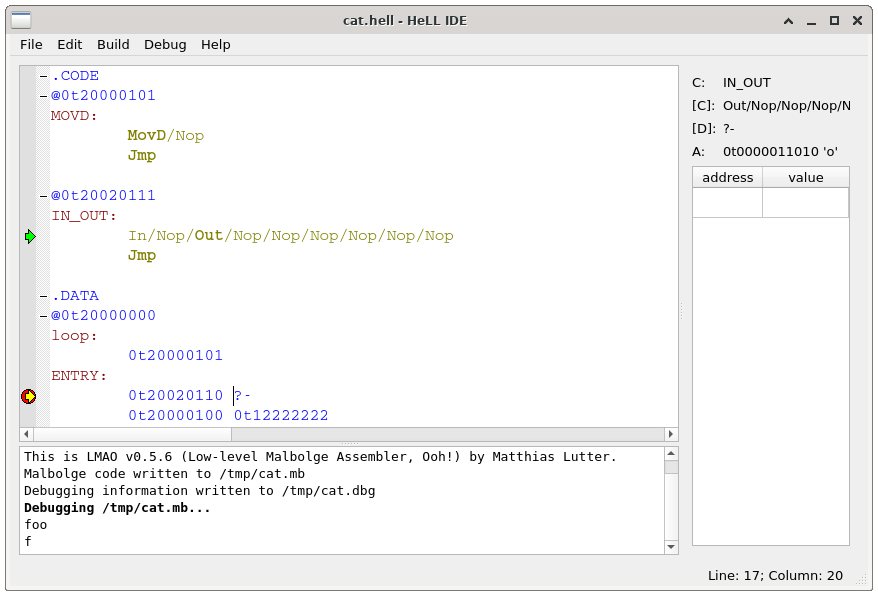
The program uses large address values, which are awkward to generate manually in the .DATA section. Small numbers are much easier to construct at runtime. Therefore, we move the code and data to low addresses in the ASCII range. Since memory cells can be initialized with a set of eight printable ASCII characters – the concrete characters that are allowed depend on the position of each memory cell modulo 94 – position, we may even be able to place some data values directly in the Malbolge source without the need to initialize them at runtime.
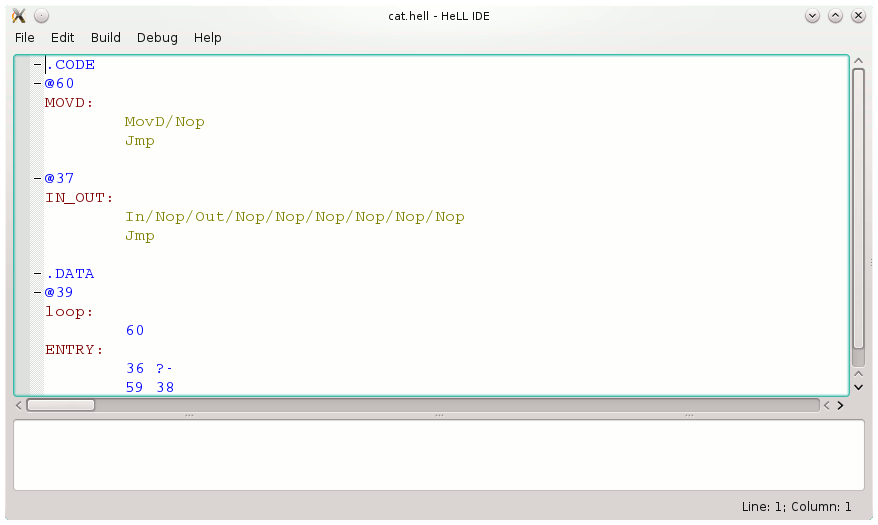
Unfortunately, this program can no longer be assembled with LMAO, because LMAO cannot initialize memory cells at the very beginning of the address space.
The address of the data section is chosen somewhat arbitrarily. The data section must not overlap
with the code section.
It must also not overlap with the memory cell immediately before a code block,
because that cell is modified every time the program jumps into the code block
(this behavior was explained earlier). Such an overlap would cause undefined behavior or crash the Malbolge reference
interpreter.
The choice of addresses for the two code blocks is more constrained.
We have to ensure that the required instruction cycles exist at those addresses.
We can look this up on Lou Scheffer's website: Instruction Cycles in Malbolge.
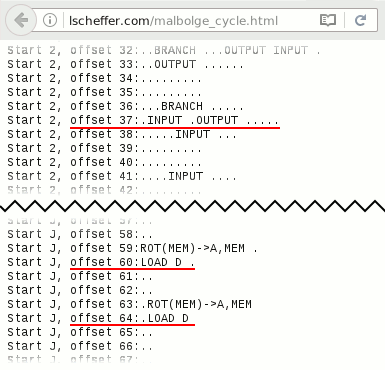
We can see that a Nop/In/Nop/Out/Nop/Nop/Nop/Nop/Nop cycle exists at address 37. Note that the dots indicate invalid instructions that are interpreted as Nops, while Nop indicates a valid instruction. Therefore, only the non-dot instructions can be directly initialized. Placing an In or Out instruction at address 37 produces the desired instruction cycle; we want to start with In. A MovD/Nop cycle exists at both address 60 and address 64. We choose address 60. This gives the memory layout shown above.
Direct initialization of memory cells
In the tables below, highlighted in yellow means a newly added row, and highlighted in green means an existing row whose comment was updated.
Now it is time to write real Malbolge code, using another page by Lou Scheffer: Valid Instructions.
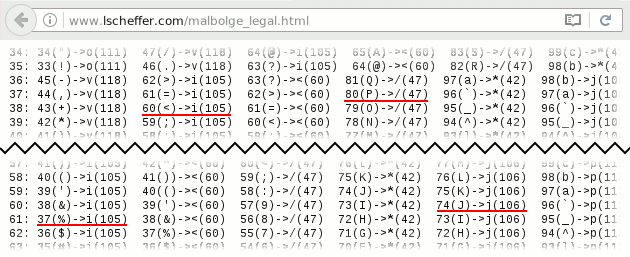
We place an In instruction at address 37 to get the In/Nop/Out/Nop/Nop/Nop/Nop/Nop/Nop instruction cycle. The In instruction (a / in normalized Malbolge) is written as 'P' at that address. For the MovD instruction (j in normalized Malbolge), we write 'J' at address 60. We place Jmp instructions (normalized Malbolge: i) immediately after each of these. Our Malbolge program now looks as follows.
1st step: Place the code section instructions at their target addresses.
| Address | Malbolge code | Normalized | Comment |
|---|---|---|---|
| 37 | P | / | In/Nop/Out/Nop/Nop/Nop/Nop/Nop/Nop |
| 38 | < | i | Jmp |
| 60 | J | j | MovD/Nop |
| 61 | % | i | Jmp |
The entire code section is now complete. It remains to initialize the data section. We continue using Lou Scheffer's valid instructions table to identify which data cells can be directly placed in the Malbolge source.
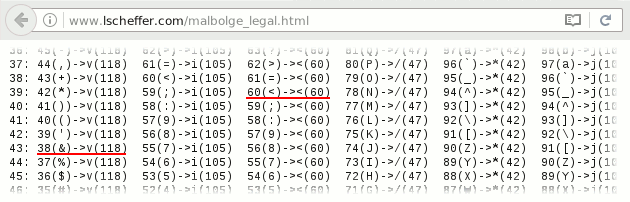
We are in luck: the value 60 at address 39 and the value 38 at address 43 can be directly initialized. The other two data cells – value 36 at address 40 and value 59 at address 42 – cannot be placed in the Malbolge code directly; we will handle them in the next section. Our Malbolge program at this point:
2nd step: Direct initialization of data section cells (added: addresses 39 and 43).
| Address | Malbolge code | Normalized | Comment |
|---|---|---|---|
| 37 | P | / | In/Nop/Out/Nop/Nop/Nop/Nop/Nop/Nop |
| 38 | < | i | Jmp |
| 39 | < | < | 60 (R_MOVD) |
| 43 | & | v | 38 (loop) |
| 60 | J | j | MovD/Nop |
| 61 | % | i | Jmp |
Runtime initialization of memory cells
We must initialize the remaining data section cells at runtime,
since they cannot be placed directly in the source code.
For this we write use-once initialization code, meaning we do not need to worry about instruction cycles.
We need the ternary number system and the Opr instruction, because data manipulation
in Malbolge is only possible using the two instructions Opr and Rot, which operate in ternary.
For ternary arithmetic you may want to use the
online calculator.
You may also want to look up the Opr instruction in
Esolangs' Malbolge documentation if you do not have it memorized yet.
Before runtime initialization begins
Before writing the runtime initialization code, we need to do some basic setup. Every Malbolge program begins with all three registers set to zero. We must separate the code pointer and the data pointer before any Rot or Opr instruction is executed; otherwise the reference interpreter will very likely crash. We start with a MovD instruction at address 0 to separate both pointers (a Jmp instruction would also work). A MovD instruction at address 0 is encoded as an opening bracket (ASCII value 40), so after this step the D register will hold the value 41. Our Malbolge program now:
3rd step: Add initial MovD at address 0 to separate the code and data pointers (added: address 0).
| Address | Malbolge code | Normalized | Comment |
|---|---|---|---|
| 0 | ( | j | MovD |
| 37 | P | / | In/Nop/Out/Nop/Nop/Nop/Nop/Nop/Nop |
| 38 | < | i | Jmp |
| 39 | < | < | 60 (R_MOVD) |
| 43 | & | v | 38 (loop) |
| 60 | J | j | MovD/Nop |
| 61 | % | i | Jmp |
As stated above, the A register is initialized with zero. Values where every ternary digit is the same, i.e. 0t0000000000 (also called C0 in HeLL), 0t1111111111 (called C1 in HeLL), and 0t2222222222 (called C2 in HeLL), are very useful, so we save the A register before doing anything that changes it. We can save the value 0t1111111111 by performing an Opr instruction on a memory cell that contains no ternary digit 2. We use the current D register address (address 41) for this: it is not used by our HeLL code and can be initialized with 0t0000001111, which contains no ternary 2. Now our Malbolge program looks as follows:
4th step: Save the A register to address 41 via Opr (added: addresses 1 and 41).
| Address | Malbolge code | Normalized | Comment |
|---|---|---|---|
| 0 | ( | j | MovD |
| 1 | = | p | Opr |
| 37 | P | / | In/Nop/Out/Nop/Nop/Nop/Nop/Nop/Nop |
| 38 | < | i | Jmp |
| 39 | < | < | 60 (R_MOVD) |
| 41 | ( | v | 0t0000001111; will be 0t1111111111 after the 2nd step |
| 43 | & | v | 38 (loop) |
| 60 | J | j | MovD/Nop |
| 61 | % | i | Jmp |
Initialization of address 40
The first memory cell to initialize is cell 40, which needs the value 36 – ternary 0t0000001100. From Lou Scheffer's valid instructions overview, address 40 can be initialized with 58 – ternary 0t0000002011. This value can be transformed into the target by a single Opr with A = 0t1111112011.
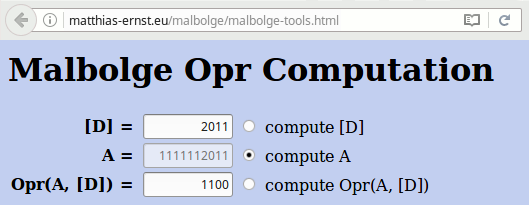
We now write code to load 0t1111112011 into the A register. This can be done by reading 0t0000000200 into A and performing an Opr with 0t0000002000. Both steps are straightforward since 0t0000002000 is a valid ASCII value.
The Malbolge code to initialize address 40 is as follows:
Rot 0t0000002000 // afterwards A = 0t0000000200
Opr A into 0t0000002000 // afterwards A = 0t1111112011
Opr A into 0t0000002011 at address 40 // afterwards [40] = 0t0000001100
The D register points at address 42 right now. However, we should not use address 42, because we need to initialize it later and we may want to write a value there that helps us for its initialization (like the value 0t0000002011 that we will put at address 40).
However, we are lucky and can initialize address 44 and address 45 with 0t0000002000, which is 54 in the decimal number system.
We can use the Nop instruction to advance the D register to 44, because it is incremented after every instruction.
After two Nops, the D register points to address 44, so that we can perform the Rot instruction followed by an Opr instruction on address 45.
Our current Malbolge program:
5th step: Add Nop, Rot, and Opr instructions to load a useful value into A (added: addresses 2–5, 40, 44, 45).
| Address | Malbolge code | Normalized | Comment |
|---|---|---|---|
| 0 | ( | j | MovD |
| 1 | = | p | Opr |
| 2 | B | o | Nop |
| 3 | A | o | Nop |
| 4 | # | * | Rot |
| 5 | 9 | p | Opr |
| 37 | P | / | In/Nop/Out/Nop/Nop/Nop/Nop/Nop/Nop |
| 38 | < | i | Jmp |
| 39 | < | < | 60 (R_MOVD) |
| 40 | : | i | 0t0000002011, should become 0t0000001100 later |
| 41 | ( | v | 0t0000001111; will be 0t1111111111 after the 2nd step |
| 43 | & | v | 38 (loop) |
| 44 | 6 | i | 0t000002000; will be 0t0000000200 after the 5th step |
| 45 | 6 | < | 0t000002000; will be 0t1111112011 after the 6th step |
| 60 | J | j | MovD/Nop |
| 61 | % | i | Jmp |
The A register now holds 0t1111112011 and the D register points to address 46. To complete initialization of address 40 we need to bring D there for the Opr instruction. We write the value 35 at address 46 and use a MovD to set D to address 36, then add four Nop instructions to step D up to address 40 for the final Opr.
6th step: Navigate D to address 40 with a MovD and four Nops, then Opr to initialize address 40 (added: addresses 6–11, 46; comment at address 40 updated).
| Address | Malbolge code | Normalized | Comment |
|---|---|---|---|
| 0 | ( | j | MovD |
| 1 | = | p | Opr |
| 2 | B | o | Nop |
| 3 | A | o | Nop |
| 4 | # | * | Rot |
| 5 | 9 | p | Opr |
| 6 | " | j | MovD |
| 7 | = | o | Nop |
| 8 | < | o | Nop |
| 9 | ; | o | Nop |
| 10 | : | o | Nop |
| 11 | 3 | p | Opr |
| 37 | P | / | In/Nop/Out/Nop/Nop/Nop/Nop/Nop/Nop |
| 38 | < | i | Jmp |
| 39 | < | < | 60 (R_MOVD) |
| 40 | : | i | 0t0000002011, will be 0t0000001100 after the 12th step |
| 41 | ( | v | 0t0000001111; will be 0t1111111111 after the 2nd step |
| 43 | & | v | 38 (loop) |
| 44 | 6 | i | 0t000002000; will be 0t0000000200 after the 5th step |
| 45 | 6 | < | 0t000002000; will be 0t1111112011 after the 6th step |
| 46 | # | v | 35 (destination for D register) |
| 60 | J | j | MovD/Nop |
| 61 | % | i | Jmp |
Initialization of address 42
It remains to initialize memory cell 42 with the value 59 – ternary 0t0000002012. Cell 42 can be pre-loaded with 0t0000002002 and then transformed to the target by an Opr with A = 0t1111111101. The value 0t1111111101 can be produced by an Opr with A = 0t0000000020 and [D] = 0t0000000000. We earlier wrote 0t1111111111 at address 41; that can be cleared to 0t0000000000 by an Opr with itself.
Rot 0t1111111111 at address 41 // afterwards A = 0t1111111111
Opr A into 0t1111111111 at address 41 // afterwards [41] = 0t0000000000
Rot 0t0000000200 at address 44 // afterwards A = 0t0000000020
Opr A into 0t0000000000 at address 41 // afterwards A = 0t1111111101
Opr A into 0t0000002002 at address 42 // afterwards [42] = 0t0000002012
We begin by resetting address 41 to 0t0000000000. At this point D points to address 41, directly behind the last cell we touched. We can use the value 38 stored at address 43 to move D back to address 41 whenever needed and write the following code.
// D = 41, [D] = 0t1111111111
Rot
// D = 42, A = 0t1111111111
Nop
// D = 43, [D] = 38
MovD
// D = 39
Nop
// D = 40
Nop
// D = 41, A = [D] = 0t1111111111
Opr
// D = 42, [41] = 0t0000000000
Our Malbolge code is now as follows.
7th step: Rotate and Opr sequence to begin initializing address 42 (added: addresses 12–17, 42; comment at address 41 updated).
| Address | Malbolge code | Normalized | Comment |
|---|---|---|---|
| 0 | ( | j | MovD |
| 1 | = | p | Opr |
| 2 | B | o | Nop |
| 3 | A | o | Nop |
| 4 | # | * | Rot |
| 5 | 9 | p | Opr |
| 6 | " | j | MovD |
| 7 | = | o | Nop |
| 8 | < | o | Nop |
| 9 | ; | o | Nop |
| 10 | : | o | Nop |
| 11 | 3 | p | Opr |
| 12 | y | * | Rot |
| 13 | 7 | o | Nop |
| 14 | x | j | MovD |
| 15 | 5 | o | Nop |
| 16 | 4 | o | Nop |
| 17 | - | p | Opr |
| 37 | P | / | In/Nop/Out/Nop/Nop/Nop/Nop/Nop/Nop |
| 38 | < | i | Jmp |
| 39 | < | < | 60 (R_MOVD) |
| 40 | : | i | 0t0000002011, will be 0t0000001100 after the 12th step |
| 41 | ( | v | 0t0000001111; will be 0t0000000000 after the 18th step |
| 42 | 8 | i | 0t0000002002, should become 0t0000002012 later |
| 43 | & | v | 38 (loop) |
| 44 | 6 | i | 0t000002000; will be 0t0000000200 after the 5th step |
| 45 | 6 | < | 0t000002000; will be 0t1111112011 after the 6th step |
| 46 | # | v | 35 (destination for D register) |
| 60 | J | j | MovD/Nop |
| 61 | % | i | Jmp |
The D register points to address 42 now. We can rotate 0t0000000200 at address 44 to load 0t0000000020 into the A register, Opr it into address 41 and Opr the result 0t1111111101 into address 42.
// D = 42
Nop
// D = 43
Nop
// D = 44, [D] = 0t0000000200
Rot
// D = 45, A = 0t0000000020
Nop
// D = 46, [D] = 35
MovD
// D = 36
Nop
// D = 37
Nop
// D = 38
Nop
// D = 39
Nop
// D = 40
Nop
// D = 41, A = 0t0000000020, [D] = 0t0000000000
Opr
// D = 42, A = 0t1111111101, [D] = 0t0000002002
Opr
// D = 43, [42] = 0t0000002010
Our current Malbolge program:
8th step: Complete initialization of address 42 (added: addresses 18–29; comments at addresses 41, 42, and 44 updated).
| Address | Malbolge code | Normalized | Comment |
|---|---|---|---|
| 0 | ( | j | MovD |
| 1 | = | p | Opr |
| 2 | B | o | Nop |
| 3 | A | o | Nop |
| 4 | # | * | Rot |
| 5 | 9 | p | Opr |
| 6 | " | j | MovD |
| 7 | = | o | Nop |
| 8 | < | o | Nop |
| 9 | ; | o | Nop |
| 10 | : | o | Nop |
| 11 | 3 | p | Opr |
| 12 | y | * | Rot |
| 13 | 7 | o | Nop |
| 14 | x | j | MovD |
| 15 | 5 | o | Nop |
| 16 | 4 | o | Nop |
| 17 | - | p | Opr |
| 18 | 2 | o | Nop |
| 19 | 1 | o | Nop |
| 20 | q | * | Rot |
| 21 | / | o | Nop |
| 22 | p | j | MovD |
| 23 | - | o | Nop |
| 24 | , | o | Nop |
| 25 | + | o | Nop |
| 26 | * | o | Nop |
| 27 | ) | o | Nop |
| 28 | " | p | Opr |
| 29 | ! | p | Opr |
| 37 | P | / | In/Nop/Out/Nop/Nop/Nop/Nop/Nop/Nop |
| 38 | < | i | Jmp |
| 39 | < | < | 60 (R_MOVD) |
| 40 | : | i | 0t0000002011, will be 0t0000001100 after the 12th step |
| 41 | ( | v | 0t0000001111; will be 0t1111111101 after the 29th step |
| 42 | 8 | i | 0t0000002002, will be 0t0000002012 after the 30th step |
| 43 | & | v | 38 (loop) |
| 44 | 6 | i | 0t000002000; will be 0t0000000020 after the 21st step |
| 45 | 6 | < | 0t000002000; will be 0t1111112011 after the 6th step |
| 46 | # | v | 35 (destination for D register) |
| 60 | J | j | MovD/Nop |
| 61 | % | i | Jmp |
Running the initialized code
All that remains is to launch the fully initialized HeLL program. We need one Jmp instruction with D pointing to the entry point (labeled ENTRY in HeLL), which is at address 40. D currently points to 43; after a MovD it will be at address 39, so we add:
// D = 43, [D] = 38
MovD
// D = 39
Nop
// D = 40
Jmp
The final Malbolge program looks as follows.
9th step: Add MovD, Nop, and Jmp to start the initialized HeLL program (added: addresses 30–32).
| Address | Malbolge code | Normalized | Comment |
|---|---|---|---|
| 0 | ( | j | MovD |
| 1 | = | p | Opr |
| 2 | B | o | Nop |
| 3 | A | o | Nop |
| 4 | # | * | Rot |
| 5 | 9 | p | Opr |
| 6 | " | j | MovD |
| 7 | = | o | Nop |
| 8 | < | o | Nop |
| 9 | ; | o | Nop |
| 10 | : | o | Nop |
| 11 | 3 | p | Opr |
| 12 | y | * | Rot |
| 13 | 7 | o | Nop |
| 14 | x | j | MovD |
| 15 | 5 | o | Nop |
| 16 | 4 | o | Nop |
| 17 | - | p | Opr |
| 18 | 2 | o | Nop |
| 19 | 1 | o | Nop |
| 20 | q | * | Rot |
| 21 | / | o | Nop |
| 22 | p | j | MovD |
| 23 | - | o | Nop |
| 24 | , | o | Nop |
| 25 | + | o | Nop |
| 26 | * | o | Nop |
| 27 | ) | o | Nop |
| 28 | " | p | Opr |
| 29 | ! | p | Opr |
| 30 | h | j | MovD |
| 31 | % | o | Nop |
| 32 | B | i | Jmp |
| 37 | P | / | In/Nop/Out/Nop/Nop/Nop/Nop/Nop/Nop |
| 38 | < | i | Jmp |
| 39 | < | < | 60 (R_MOVD) |
| 40 | : | i | 0t0000002011, will be 0t0000001100 after the 12th step |
| 41 | ( | v | 0t0000001111; will be 0t1111111101 after the 29th step |
| 42 | 8 | i | 0t0000002002, will be 0t0000002012 after the 30th step |
| 43 | & | v | 38 (loop) |
| 44 | 6 | i | 0t000002000; will be 0t0000000020 after the 21st step |
| 45 | 6 | < | 0t000002000; will be 0t1111112011 after the 6th step |
| 46 | # | v | 35 (destination for D register) |
| 60 | J | j | MovD/Nop |
| 61 | % | i | Jmp |
Fortunately, the entire initialization code fits in the memory below address 37.
Finishing our work
All that is left is to fill the unused memory cells – addresses 33 to 36 and addresses 47 to 59 – with arbitrary valid instructions. We choose the Hlt instruction and obtain the final Malbolge cat program:
Final step: Add padding (added: addresses 33–36, 47–59).
| Address | Malbolge code | Normalized | Comment |
|---|---|---|---|
| 0 | ( | j | MovD |
| 1 | = | p | Opr |
| 2 | B | o | Nop |
| 3 | A | o | Nop |
| 4 | # | * | Rot |
| 5 | 9 | p | Opr |
| 6 | " | j | MovD |
| 7 | = | o | Nop |
| 8 | < | o | Nop |
| 9 | ; | o | Nop |
| 10 | : | o | Nop |
| 11 | 3 | p | Opr |
| 12 | y | * | Rot |
| 13 | 7 | o | Nop |
| 14 | x | j | MovD |
| 15 | 5 | o | Nop |
| 16 | 4 | o | Nop |
| 17 | - | p | Opr |
| 18 | 2 | o | Nop |
| 19 | 1 | o | Nop |
| 20 | q | * | Rot |
| 21 | / | o | Nop |
| 22 | p | j | MovD |
| 23 | - | o | Nop |
| 24 | , | o | Nop |
| 25 | + | o | Nop |
| 26 | * | o | Nop |
| 27 | ) | o | Nop |
| 28 | " | p | Opr |
| 29 | ! | p | Opr |
| 30 | h | j | MovD |
| 31 | % | o | Nop |
| 32 | B | i | Jmp |
| 33 | 0 | v | Hlt (padding) |
| 34 | / | v | Hlt (padding) |
| 35 | . | v | Hlt (padding) |
| 36 | ~ | o | Nop (padding) |
| 37 | P | / | In/Nop/Out/Nop/Nop/Nop/Nop/Nop/Nop |
| 38 | < | i | Jmp |
| 39 | < | < | 60 (R_MOVD) |
| 40 | : | i | 0t0000002011, will be 0t0000001100 after the 12th step |
| 41 | ( | v | 0t0000001111; will be 0t1111111101 after the 29th step |
| 42 | 8 | i | 0t0000002002, will be 0t0000002012 after the 30th step |
| 43 | & | v | 38 (loop) |
| 44 | 6 | i | 0t000002000; will be 0t0000000020 after the 21st step |
| 45 | 6 | < | 0t000002000; will be 0t1111112011 after the 6th step |
| 46 | # | v | 35 (destination for D register) |
| 47 | " | v | Hlt (padding) |
| 48 | ! | v | Hlt (padding) |
| 49 | ~ | v | Hlt (padding) |
| 50 | } | v | Hlt (padding) |
| 51 | | | v | Hlt (padding) |
| 52 | { | v | Hlt (padding) |
| 53 | z | v | Hlt (padding) |
| 54 | y | v | Hlt (padding) |
| 55 | x | v | Hlt (padding) |
| 56 | w | v | Hlt (padding) |
| 57 | v | v | Hlt (padding) |
| 58 | u | v | Hlt (padding) |
| 59 | g | o | Nop (padding) |
| 60 | J | j | MovD/Nop |
| 61 | % | i | Jmp |
Malbolge code of the final program:
(=BA#9"=<;:3y7x54-21q/p-,+*)"!h%B0/.
~P<
<:(8&
66#"!~}|{zyxwvu
gJ%
Note that this program does not terminate.
4. Further Reading
- Lou Scheffer: Programming in Malbolge
- Esolangs: Malbolge programming
- Matthias Lutter: Reverse Engineering of Malbolge Programs
- Matthias Lutter @github: LMAO